AWS Kinesis in Practice: How I Build Real-Time Data Pipelines on AWS
AWS Kinesis helps you move from batch to real-time. In this post, I’ll walk through how Kinesis works, the key concepts you really need to know, and a couple of real-world architectures using Kinesis for logs and IoT-style data.
I. Why real-time streaming matters
For many years, we were happy with batch:
- Every hour: export logs, run a cron job, push to S3
- Every night: run a big ETL job, load to a data warehouse
- Product teams wait until “tomorrow” for reports
Today, that’s often not enough:
- Product managers want live dashboards.
- Ops teams want to detect incidents in minutes, not hours.
- Recommendation systems, alerts, pricing engines need fresh data.
This is where streaming comes in. Instead of waiting for a batch job, events are pushed as a continuous stream:
- A user clicks a button → event is sent within seconds
- A sensor sends a reading every 5 seconds
- A service logs a request and error
AWS Kinesis is one of the main AWS-native ways to handle this streaming world.
II. What is AWS Kinesis?
AWS Kinesis is a family of managed services for streaming data:
Kinesis Data Streams
- Core building block
- Ingests ordered streams of records in real time
- Your apps produce and consume events directly from the stream
Amazon Data Firehose
- Fully managed “buffer and deliver” service
- Ingests streaming data and delivers to S3, Redshift, OpenSearch, or a custom HTTP endpoint
- No need to manage shards – AWS handles scaling for you
Amazon Managed Service for Apache Flink
- Run SQL or Flink applications over streaming data
- Use it to build real-time metrics, aggregations, sliding windows, etc.
Kinesis Video Streams
- For streaming video from cameras/IoT devices
III. Core concepts
1. Stream, records & partition key
- A stream is like a pipe of ordered data.
- Your producer (app, Lambda, etc.) sends records into the stream.
- Each record has:
- Partition key: used to route the record to a shard
- Sequence number: to keep ordering within a shard
- Data blob: your JSON payload, bytes, etc.
Records with the same partition key always go to the same shard, and therefore keep order relative to each other.
2. Shards (capacity & scaling)
A shard is the unit of capacity in a Kinesis Data Stream:
- Ingest: ~1 MB/s or 1000 records/s per shard
- Read: ~2 MB/s per shard
If your system needs more throughput, you:
- Add shards (scale-out)
- Use on-demand mode, where AWS scales shard capacity for you (higher cost, less manual work)
3. Retention
Kinesis Data Streams can retain data for hours → days (even up to 365 days with extended retention). This means:
- Consumers can replay from an older timestamp
- You can add new consumers later and re-process historical data
4. Consumers & enhanced fan-out
Consumers are apps reading from the stream, e.g.:
- AWS Lambda
- Kinesis Client Library (KCL) workers
- Custom consumer using the Kinesis API
With enhanced fan-out, each consumer gets its own 2 MB/s pipe per shard. Without it, all consumers share the 2 MB/s read throughput per shard. For high fan-out architectures (many consumers), this matters.
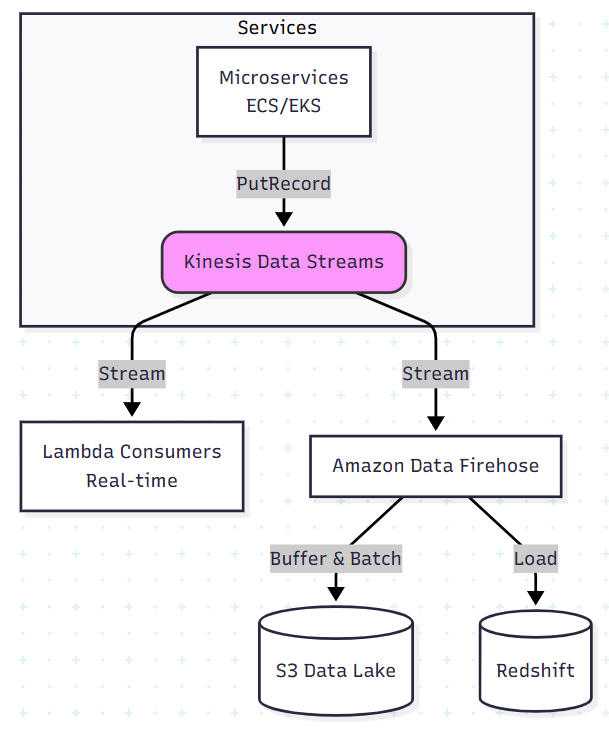
IV. Real-world architecture: microservices log & event analytics
A very common pattern: you want to centralize application logs/events and build near-real-time analytics.
Problem
- You have many services running on ECS / EKS / EC2 / Lambda
- Each service emits logs and business events (e.g. “order_created”, “payment_failed”)
- You want:
- Live dashboards and alerts (errors, latency, business KPIs)
- A data lake in S3 for long-term analysis
Architecture
- Services push events to Kinesis Data Streams
- via a language SDK or a sidecar/log forwarder
- A Amazon Data Firehose delivery stream:
- reads from Kinesis Data Streams
- buffers records (e.g. 1–5 minutes)
- delivers compacted files to S3 (e.g. gzip/Parquet)
- Optional: Amazon Managed Service for Apache Flink:
- runs SQL on the stream to compute real-time metrics
- sends output to another stream, an SNS topic, or a Lambda for alerts
- BI / analytics tools like Athena, Glue + Redshift:
- query S3 data for historical analysis and dashboards
Why this is nice
- Decoupling: producers don’t need to know who consumes the data.
- Real-time + batch from the same pipe:
- Real-time via Kinesis / Lambda / Analytics
- Batch via S3 data lake
- Scales with traffic: add shards or use on-demand mode
V. Real-world architecture: IoT sensor data pipeline
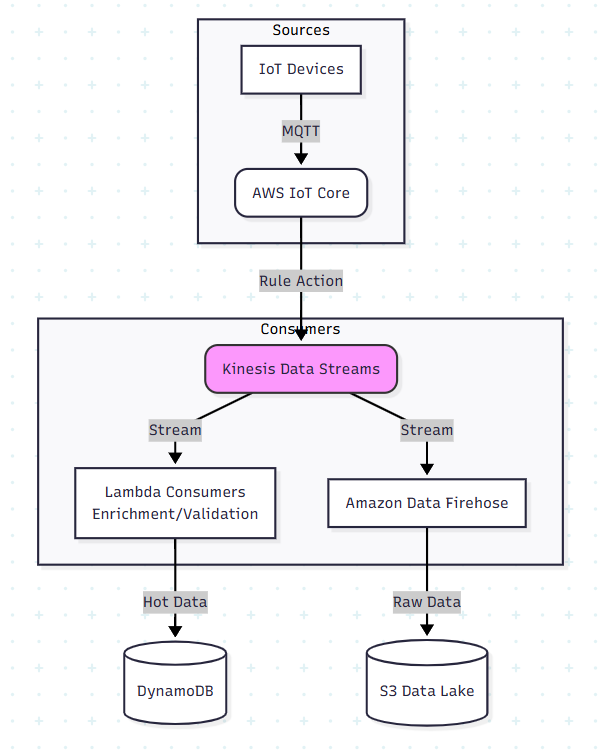
Another classic case for Kinesis is IoT / sensor data (temperature, moisture, GPS, etc.).
Problem
- Thousands of devices send readings every few seconds
- You need:
- Live alerts (thresholds, anomaly detection)
- A time-series history for future analytics & ML
Architecture
- Devices connect via AWS IoT Core or a gateway
- IoT Core routes messages to a Kinesis Data Stream
- Lambda consumers:
- validate and enrich data (add metadata: device_id, region, farm, etc.)
- write hot data to DynamoDB / time-series database for quick queries
- Amazon Data Firehose (optional) delivers all raw data to S3:
- for long-term storage & analytics
- Analytics:
- Athena/Glue/Redshift/EMR for historical analytics
- Managed Service for Apache Flink or Lambda-based rules for real-time alerts
This architecture is very close to real-world projects in smart farming, smart home, logistics, EV charging, etc.
VI. Minimal Kinesis pipeline: Terraform + Python example
Terraform: create a Kinesis stream
resource "aws_kinesis_stream" "events" {
  name             = "demo-events-stream"
  shard_count      = 1
  retention_period = 24

  stream_mode_details {
    stream_mode = "PROVISIONED"
  }

  shard_level_metrics = [
    "IncomingBytes",
    "OutgoingBytes",
    "WriteProvisionedThroughputExceeded"
  ]

  tags = {
    Environment = "dev"
    Project     = "kinesis-demo"
  }
}
Python producer (send events)
import json
import time
import uuid

import boto3

kinesis = boto3.client("kinesis", region_name="ap-southeast-1")
STREAM_NAME = "demo-events-stream"


def put_event(event_type: str, payload: dict):
    record = {
        "id": str(uuid.uuid4()),
        "event_type": event_type,
        "payload": payload,
        "timestamp": int(time.time() * 1000),
    }

    response = kinesis.put_record(
        StreamName=STREAM_NAME,
        Data=json.dumps(record).encode("utf-8"),
        PartitionKey=payload.get("user_id", "anonymous"),
    )
    return response


if __name__ == "__main__":
    for i in range(10):
        put_event(
            "user_clicked_button",
            {"user_id": f"user-{i}", "button": "signup"},
        )
        print(f"Sent event {i}")
        time.sleep(0.5)
Simple consumer (poll shard iterator)
In production you would typically use KCL or Lambda as consumers, but a simple example helps understanding:
import json
import boto3

kinesis = boto3.client("kinesis", region_name="ap-southeast-1")
STREAM_NAME = "demo-events-stream"


def get_shard_iterator():
    stream = kinesis.describe_stream_summary(StreamName=STREAM_NAME)
    stream_desc = kinesis.describe_stream(StreamName=STREAM_NAME)
    shard_id = stream_desc["StreamDescription"]["Shards"][0]["ShardId"]

    response = kinesis.get_shard_iterator(
        StreamName=STREAM_NAME,
        ShardId=shard_id,
        ShardIteratorType="TRIM_HORIZON",  # or LATEST
    )
    return response["ShardIterator"]


if __name__ == "__main__":
    shard_iterator = get_shard_iterator()

    while True:
        out = kinesis.get_records(ShardIterator=shard_iterator, Limit=100)
        shard_iterator = out["NextShardIterator"]

        for record in out["Records"]:
            data = json.loads(record["Data"])
            print("Got record:", data)

        # avoid tight loop
        import time
        time.sleep(1)
VII. Cost, scaling & operational tips
- Estimate throughput early
- number of records/sec × avg payload size
- from there, calculate required shards (or decide on on-demand)
- Choose partition keys carefully
- Avoid “hot partitions” (e.g. same key for all traffic)
- Use a key that spreads load (user_id, device_id, etc.)
- Set retention based on real needs
- Longer retention = higher cost
- For many systems: 1–7 days in Kinesis + long-term in S3
- Use Firehose for S3/Redshift
- Don’t reinvent buffering + compression + batching yourself
- Monitoring
- Watch IncomingBytes, WriteProvisionedThroughputExceeded, ReadProvisionedThroughputExceeded
- Set CloudWatch alarms
- Test replays
- Occasionally test consuming from an older timestamp to ensure you can recover / reprocess data when needed
VIII. The Decision Matrix: Kinesis vs. Kafka vs. SQS
People often ask, “Why not just use Kafka for everything?” or “Is SQS enough?” Don’t just choose based on popularity; choose based on your ops appetite and data patterns.
1. Kinesis Data Streams vs. Kafka (MSK / Self-Hosted)
The Core Difference: Kinesis is serverless (you manage shards). Kafka is cluster-based (you manage brokers/storage, even with MSK).
Choose Kinesis if:
- You are 100% AWS: The native integration with Lambda (event source mapping) and Amazon Data Firehose is unbeatable.
- You want low Ops: Scaling Kinesis is just an API call to split shards (or enabling On-Demand mode). Scaling Kafka often involves rebalancing partitions and managing broker disk space.
- Simplicity: You have a specific data pipe (e.g., “Logs to S3”) and don’t want to maintain a cluster.
Choose Kafka (MSK) if:
- No Vendor Lock-in: You need an open standard to potentially run on Azure, GCP, or on-prem.
- Complex Retention (Log Compaction): You need features like Log Compaction (keeping only the latest state of a key), which Kinesis does not support.
- Extreme Scale/Cost: At massive scale (GBs/sec), a fixed-size Kafka cluster might be more cost-effective than paying per-shard fees in Kinesis.
- Ecosystem: You rely heavily on Kafka Connect, KSQL, or the Schema Registry.
2. Kinesis vs. SQS
The Core Difference: Ordering and Replayability.
Choose SQS:
- You need a simple job queue (e.g., “send this email”, “resize this image”).
- Ordering is not critical (or best-effort is sufficient).
- Once a message is processed, it should disappear (no replay).
Choose Kinesis:
- Ordering is mandatory: (e.g., Inventory updates must happen in sequence: Created -> Updated -> Deleted).
- Multiple Consumers: Several distinct apps need to read the same stream of events independently.
- Replayability: You might need to “rewind” the stream to re-process the last 24 hours of data after fixing a bug.
3. Summary Rule of Thumb
- Async tasks/jobs? -> SQS.
- Real-time data pipeline on AWS? -> Kinesis.
- Enterprise-wide event bus / Multi-cloud? -> Kafka.
IX. Conclusion
AWS Kinesis is more than just “another AWS service” – it’s a core building block when you move from batch to real-time systems:
- You can centralize logs and events from microservices
- You can build real-time analytics dashboards
- You can ingest IoT/sensor data at scale
- You can feed ML models and alerting pipelines with fresh data
In this post, we looked at:
- The Kinesis family and key concepts
- Two real-world architectures (logs & IoT)
- A minimal Terraform + Python example
- Practical tips for cost, scaling and service choice